
A 300-tool SaaS and AI directory where the free dofollow listing costs you a permanent badge instead of money.
toolfio.com
Eligibility
Who Toolfio accepts
You need
A live, working product
Ahrefs DR 5+ for the free tier
Their badge on your site, kept permanently (free tier)
You'll be rejected if
Crypto, adult, gambling, drugs, weapons or illegal services
Landing pages for unlaunched ideas
Clones without meaningful differentiation
SaaS toolsAI toolsIndie productsDirectories
What you actually get
A permanent dofollow backlink from a DR 60ish domain and a listing page. Expect link equity, not traffic; the directory itself is the audience draw, not your listing.
How to submit to Toolfio
1
Pick the free plan
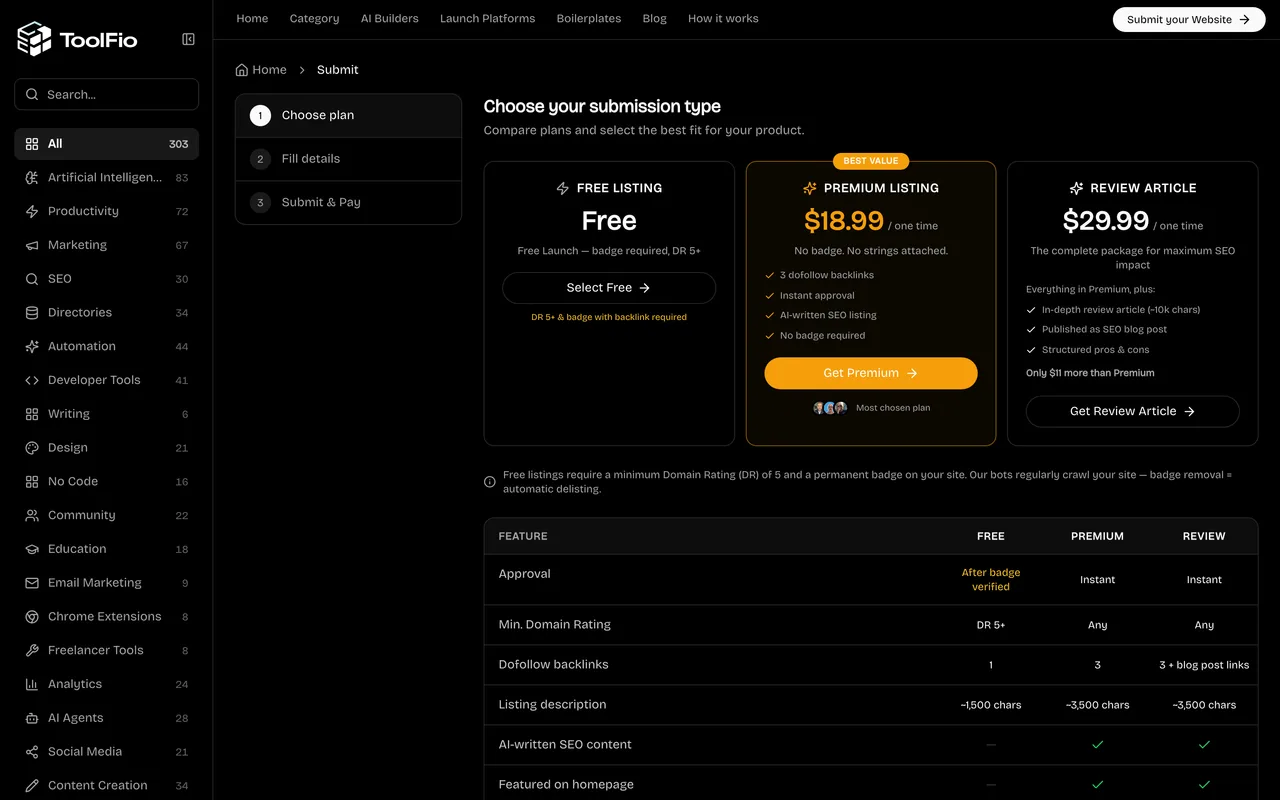
Three tiers on /submit. Free needs DR 5+ and the badge; a browser confirm dialog restates the terms before the form opens.
2
Fill the product form
URL, name, a 256-character description, a 500 to 2,000 character markdown introduction, categories and pricing tags. No account needed.
3
Upload media
A 1:1 logo and a 16:9 screenshot, PNG or JPEG, 1MB each. Uploads fire only after badge verification.
4
Place and verify the badge
Paste their snippet on your site, then click Verify Backlink. Their bot fetches your page live; the badge must stay up forever or the listing is delisted.
5
Submit past the upsell
The Submit button opens a premium upsell modal every time; Continue with Free is the actual submission click.
Toolfio requirements
1:1 logo (PNG/JPEG, 1MB max)
16:9 screenshot (PNG/JPEG, 1MB max)
256-char description + 500-2,000 char intro
Badge live on your site before verification
Contact email
LinkedIn and X profile linksoptional
Gotchas
A hidden honeypot field sits in the form; autofill tools that touch it get the submission silently dropped with no error shown.
Badge removal means automatic delisting; their bot re-crawls your site on a schedule.
No success feedback either way: a sub-DR-5 site is refused only via a native browser dialog at the final step, and a good submission just quietly clears the form.
Agent prompt for Toolfio
A full walkthrough of this form for your AI agent: every field, limit and trap. The placeholders come from your submission pack (template with a live example).
Paste into your agent
You are an AI agent with browser automation (Chrome connector, Playwright, browser-use or similar). Submit my product to Toolfio's free tier end to end. My submission pack is pasted at the bottom; it is the single source of truth for every answer. Do not invent copy.

My product: {NAME} ({URL})

BEFORE YOU START
1. Check eligibility: the free tier needs Ahrefs DR 5 or higher and a permanent badge on my site. If my domain is younger or weaker than DR 5, stop and tell me; the check happens silently at the very last step and wastes the whole run. The $18.99 premium tier skips both requirements but is my decision, not yours.
2. Open a fresh tab at https://toolfio.com/submit.
3. Immediately run in the page console: window.confirm = () => true; window.alert = () => {}; Toolfio uses native confirm() dialogs (clicking Select Free triggers one) and an unanswered native dialog freezes every CDP-driven tool. Re-run this after any full page reload.

THE FORM (no account needed)
4. Click Select Free on the plan step.
5. Fill with native value setters, not plain .value: the form is React-controlled. Pattern: Object.getOwnPropertyDescriptor(HTMLInputElement.prototype,'value').set.call(input, value), then dispatch 'input' and 'change' events. Fields: Link ({URL}), Product name ({NAME}), Description (max 256 chars; trim my pack's short description, do not rewrite it), Introduction (500 to 2,000 chars of markdown; use my pack's long description; the editor is CodeMirror, so use document.querySelector('.CodeMirror').CodeMirror.setValue(text)).
6. Categories and tags are custom dropdowns that ignore synthetic events. Open them and click the real options (screenshot first, click by coordinates or accessibility refs). Pick up to three categories that match my pack and the pricing tag that matches my pricing. Verify the chips actually appeared.
7. Images: 1:1 logo and 16:9 screenshot, PNG or JPEG, 1MB max each. Fetch my pack's asset URLs in the page, crop on a canvas to the exact ratio if needed, then inject: build a File, put it in a DataTransfer, defineProperty the input's files, dispatch 'change'. Wait for the dropzone preview to render before moving on.
8. Email: use my contact email from the pack. Tick the two required checkboxes (content policy, terms) with real clicks on the rendered boxes and confirm they are visibly checked; synthetic input.click() does not update their React state. Leave the promotional-email checkbox unchecked.

THE HONEYPOT (this will silently kill your run)
9. The input named website_url_confirm doubles as the badge-verification URL field AND the anti-bot honeypot. Sequence that works: fill it with {URL}, click Verify Backlink, wait for 'Badge verified', then CLEAR the field back to empty before submitting. If it holds any value at submit time, the submission is dropped with no error, no network call, nothing.

BADGE
10. Before verification can pass, their badge snippet (an <a href="https://toolfio.com"> with their badge image) must be live on my site. If it is not deployed yet, stop and give me the snippet; wait until I confirm it is live, then verify.

SUBMIT
11. Click Submit. An upsell modal appears every time; 'Continue with Free' inside it is the real submission trigger. Use a real mouse click.
12. Toolfio shows NO success message. Verify the submission actually left: watch for a POST to /submit in the network log when you click, then reload the page; a cleared draft (wizard back at step 1) means it went through. Zero new network requests means something client-side blocked you; re-check the honeypot and checkboxes. If you see 'too many submissions', an earlier attempt landed; stop, do not spam.
13. Report back: what was submitted, that approval comes by email after review, and that the badge must stay up permanently or the listing is delisted.

MY PACK:

{PACK}Toolfio FAQ
How long does Toolfio approval take?
Toolfio's typical time from submission to going live is free: after badge check and review; paid: instant.
How much does it cost to submit to Toolfio?
Toolfio has a free submission option plus paid placement ($18.99 removes the badge; $29.99 adds a review article).
Does Toolfio give a dofollow backlink?
Yes, a listing on Toolfio carries a dofollow link. The site has a domain rating of 61.
Does Toolfio require a backlink to your site?
Yes, Toolfio expects a link back from your site as part of listing.
What gets you rejected from Toolfio?
Crypto, adult, gambling, drugs, weapons or illegal services; Landing pages for unlaunched ideas; Clones without meaningful differentiation.